Unplugged COMPUTER SCIENCE
http://anniemurphypaul.com/2014/08/computational-thinking-how-to-get-it-and-why-its-important/#
Year 8 Leavers videos
Created by D Shah (8FR) using iMovie
Created by A Hope (8GB) using Windows Movie Maker
Please contact Mr Kenny for access codes.
Have a great summer holiday everybody! Best of luck to all of Year 8 in their new schools and for the future; best of luck in their new schools and for the future to our Leavers from other years, esp Year 6; and best of luck for the summer holidays to everyone else in Years 3, 4, 5, 6, & 7. Looking forward to seeing you all again in September :-)
No surprise that AK won the senior long puck competition :-)
I thought @McIlroyRory declared for Ireland today and not for @OfficialDownGAA (via @sportsfile ) pic.twitter.com/VOycuCXgNS
— SkySportssGAA (@SkySportssGAA) June 18, 2014

Doodle 4 Google, Ireland 2014
Every year in Irish primary and secondary schools, Google runs a special art competition. Google give a theme and participants draw a Google doodle based on that theme.
One talented artist will see his or her artwork on the Google Ireland homepage for one day, receive a €5,000 college scholarship and a €10,000 technology grant for his or her school as well as a Chromebook for themselves and their teacher.

The theme of this year's competition was: 'My adventure...'
A pupil that I used to teach, named Marius, has reached the last 75 in all of Ireland and I'd really appreciate it if you would vote for his doodle. Click here to see it and to vote.
Thank you.
One talented artist will see his or her artwork on the Google Ireland homepage for one day, receive a €5,000 college scholarship and a €10,000 technology grant for his or her school as well as a Chromebook for themselves and their teacher.

The theme of this year's competition was: 'My adventure...'
A pupil that I used to teach, named Marius, has reached the last 75 in all of Ireland and I'd really appreciate it if you would vote for his doodle. Click here to see it and to vote.
Thank you.
Flappy Bird (Create your own!)
Create your own Flappy Bird game here and share it with your classmates on Edmodo.
Just to confirm, I did NOT build the game below but found it on the Scratch website.
Just to confirm, I did NOT build the game below but found it on the Scratch website.
Internet giants are still only young cubs
As you can see below, two of the Internet's biggest giants aren't even 10 years old yet! Facebook is only 10 years old this month. And text messaging is only in its early 20s :-)
The first video on YouTube, uploaded at 8:27 P.M. on Saturday April 23rd, 2005. The video was shot by Yakov Lapitsky at the San Diego Zoo.
The first video on YouTube, uploaded at 8:27 P.M. on Saturday April 23rd, 2005. The video was shot by Yakov Lapitsky at the San Diego Zoo.
***
The very first tweet, sent by Twitter's founder @Jack. A momentous day in the history of the internet. pic.twitter.com/IN4ysZh2ne
— Historical Pics (@HistoricalPics) August 25, 2013
***
The first text message ever was sent on December 3rd of 1992 -- It said “Merry Christmas.”
— UberFacts (@UberFacts) September 15, 2012

Geoguessr update
Top scorers
 (as at 16:13, 20th November)
TB (8AOFB): 15,285
ZV (5RM): 14,740
HG (7IM): 13,418
TL (7IM): 12,815
OM (6SD): 10,087

TB (8AOFB): 15,285
ZV (5RM): 14,740
HG (7IM): 13,418
TL (7IM): 12,815
OM (6SD): 10,087
Scratch - 1st project published!
SPMc in 6MB is the first boy in the school to have his Scratch project published online! Take a look at his project page here.
Colours in HTML (& Inserting background colours)
Reference: The International Color Name Registry - click here to go directly to the web site.
 In art, the three Primary colours are Red, Blue and Yellow. These are mixed together to make secondary colours and tertiary colours.

However, the three Primary colours of Light are Red, Green and Blue (RGB). There are 256 shades of each of these colours (numbered 0 - 255). On a computer screen, all colours are made by combining different intensities of each of these three colours. So there are 16,777,216 (256 x 256 x 256) different shades of colour that can be seen on a computer screen.
Colours in HTML can be labelled in three different ways:
 Pick colours and copy their Hexadecimal code here.
In art, the three Primary colours are Red, Blue and Yellow. These are mixed together to make secondary colours and tertiary colours.However, the three Primary colours of Light are Red, Green and Blue (RGB). There are 256 shades of each of these colours (numbered 0 - 255). On a computer screen, all colours are made by combining different intensities of each of these three colours. So there are 16,777,216 (256 x 256 x 256) different shades of colour that can be seen on a computer screen.
Colours in HTML can be labelled in three different ways:
- RGB code - (_, _, _) where each space is a value from 0 - 255. For example, this colour has an RGB code of (53,28,117). Black has an RGB code of (0,0,0) which basically means that black has no colour. It is the absence of colour. White has an RGB code of (255,255,255), the composition of all shades of all colours.
- Hexadecimal code - (#_ _ _ _ _ _) where each space is occupied by a character from this list of 16 [0 1 2 3 4 5 6 7 8 9 A B C D E F]. There are 16,777,216 different combinations for these codes (16 x 16 x 16 x 16 x 16 x 16).
- Colour name - Only 140 colours (of the possible 16,777,216 can be labelled in this way. See them here.
Pick colours and copy their Hexadecimal code here.
Convert RGB codes to Hexadecimal codes here.
Convert Hexadecimal to RGB here.
If you would like to read more about HTML colours, click here for an excellent site. You can even register a name for one of the 16,777,216 colours!!
*********************************************************************************
Here is the html code for a cell with an image in it:
<td><img ></td>
If we want to make the cell background a certain colour, we insert bgcolor="#------" as follows:
<td bgcolor="#0a0af4"><img ></td>.
Make sure it's inside the table cell tag, as shown.
Pick your colour and take the hexadecimal code from here.
If we want to make the entire row a certain colour, we insert bgcolor="#------" as follows:
<tr bgcolor="#0a0af4">
<td>row 1, cell 1</td>
<td>row 1, cell 2</td>
<td>row 1, cell 3</td>
<td>row 1, cell 4</td></tr>
Make sure it's inside the table row tag, as shown.
<td bgcolor="#0a0af4"><img ></td>.
Make sure it's inside the table cell tag, as shown.
Pick your colour and take the hexadecimal code from here.
If we want to make the entire row a certain colour, we insert bgcolor="#------" as follows:
<tr bgcolor="#0a0af4">
<td>row 1, cell 1</td>
<td>row 1, cell 2</td>
<td>row 1, cell 3</td>
<td>row 1, cell 4</td></tr>
Make sure it's inside the table row tag, as shown.
Note: In HTML, colour is spelt 'color', the American spelling.
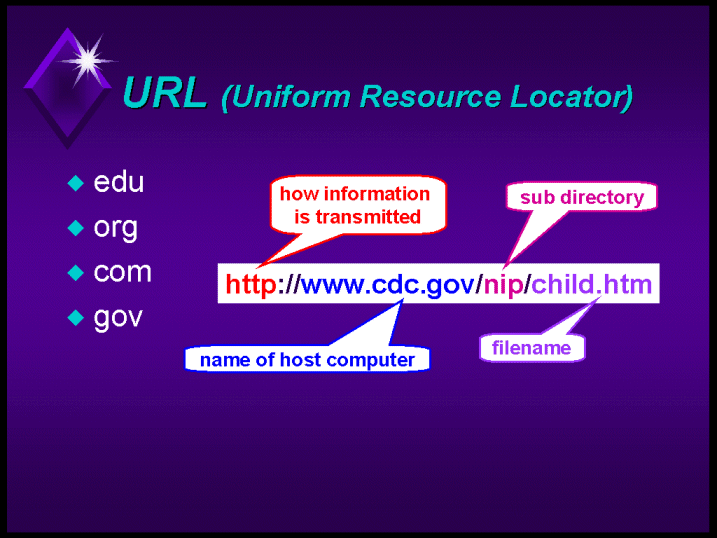
What is a URL?
A URL is basically a unique address for anything on the Internet.
It's not necessary to write the http:// protocol when you are typing a URL as the browser is able to put it in itself.
Mr Kenny's ICT has two different URLs.
These infographics will help explain the different elements of a URL.
.jpg)
.jpg)

It's not necessary to write the http:// protocol when you are typing a URL as the browser is able to put it in itself.
Mr Kenny's ICT has two different URLs.
- www.ict.stmartins.org.uk
- www.smict2013.blogspot.co.uk
These infographics will help explain the different elements of a URL.
Original image URL: http://media.hsl.washington.edu/media/schnall/nurs499c/url.gif
Original image URL: https://encrypted-tbn2.gstatic.com/images?q=tbn:ANd9GcS2t3ofKoY2ZmM3261nMRwtLerFjpqiu_h4RmLstMv_bohasAKODw

Code Avengers (ICT club) update
Thomas B. (8AOFB) currently leads the way in the HTML/CSS Coding Level 1 course.
You can see the website he has created so far here. (It is best viewed on a smartphone or tablet)
You can see the website he has created so far here. (It is best viewed on a smartphone or tablet)
Subscribe to:
Posts (Atom)